
Render Objects
Learn the foundation of Flutter's rendering layer. Master the primitives that paint every pixel on the screen.
class MyRenderBox extends RenderBox {
  @override
  void setupParentData(RenderObject child) { /**/ }

  @override
  void performLayout() { /**/ }

  @override
  bool hitTest(BoxHitTestResult result, {required Offset position}) { /**/ }

  @override
  void paint(PaintingContext ctx, Offset offset) { /**/ }

  @override
  void describeSemanticsConfiguration(SemanticsConfiguration config) { /**/ }

  @override
  void debugFillProperties(DiagnosticPropertiesBuilder properties) { /**/ }
}

Render Object Guides
With AI, you can outsource your knowledge, but not your understanding. Learn the fundamental behaviors of render objects with our guides.
Learn how render objects choose sizes and child positions with layout.
Read guide →Learn how render objects put pixels on the screen during paint, with canvas commands and layered effects.
Read guide →Learn how to build render objects with named child widgets.
Read guide →Real Code, Real Render Objects
Ground your understanding with real render object implementations, including explanations of implementation decisions.

A render object that looks similar to a Nest thermostat. A child-less render object with a complicating painting and paint-aware hit detection.
See example →
A render object that shows a file attachment in a message, with a removal button, and a clipped gap between the button and the thumbnail.
See example →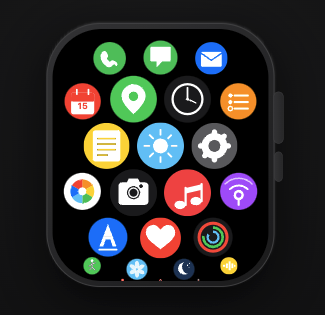
A render object that looks similar to the Apple Watch app grid. Virtualized child app icons, in an infinitely scrollable honeycomb grid with fisheye distortion. The user can drag, fling, and tap.
See example →Docs for Every Method
Get help implementing specific render object methods with our API docs.
Calculates the size of this render object and positions all its children. Must set this.size before returning.
void — called by the framework during the layout phaseDraws the visual representation of this render object onto the composited layer. Called after layout completes.
void — uses context.canvas for direct drawing operationsDetermines whether a pointer event at position falls within this render object. Returns true to claim the event.
bool — true if the hit test is absorbed by this render object