The Apple Watch displays an app selector that looks like a honeycomb grid, which scrolls vertically, and sizes the app icons with a kind of fisheye distortion.
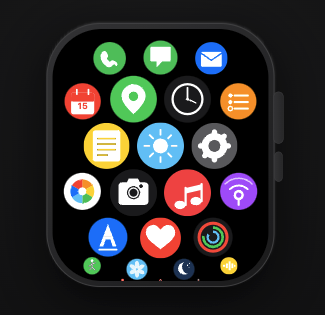
The user can pan left/right/up/down. The user can scroll and fling vertically. When the user pans or flings beyond the boundary of the content, a springy overscroll is applied, which pulls the content back into frame.
This UI is a good candidate for a custom render object for the following reasons:
- Has child widgets
- Layout of child size and position is nuanced
- Only visible children should be built, therefore build happens during layout
This example shows you how you might build such a render object.

Try it Out#
Play with the custom render object to observe both the honeycomb layout, as well as scrolling, flinging, and overscroll behaviors.
Implementation#
Custom Element#
The app grid builds child widgets on-demand. This requires a custom Element to run widget builds.
Both the custom Element and custom RenderBox are created by a Widget, so we define that first.
/// Widget that displays a scrollable hexagonal grid of app icons.
class WatchAppGrid extends RenderObjectWidget {
  const WatchAppGrid({super.key, this.childCount, this.onAppPressed, required this.builder});

  final int? childCount;

  /// Called with the index of the app icon the user tapped.
  final ValueChanged<int>? onAppPressed;

  final Widget? Function(BuildContext context, int index) builder;

  @override
  WatchAppGridElement createElement() => WatchAppGridElement(this);

  @override
  RenderWatchAppGridLayout createRenderObject(BuildContext context) {
    return RenderWatchAppGridLayout(childManager: context as LazyChildDelegate, onAppPressed: onAppPressed);
  }

  @override
  void updateRenderObject(BuildContext context, RenderWatchAppGridLayout renderObject) {
    renderObject.onAppPressed = onAppPressed;
  }
}
The custom Element is defined below.
The app grid render object requires that a few responsibilities be built into a custom Element:
- Track the child
Elements, e.g., insert, move, forget, remove. -
Build and dispose child
Elements during layout, e.g.,createOrUpdateChildDuringLayout()andremoveChildDuringLayout(). - Visit each child, when requested, e.g.,
visitChildren(). -
Notify the render object whether
Tickers are currently enabled or not (important for widget tests).
class WatchAppGridElement extends RenderObjectElement implements LazyChildDelegate {
  WatchAppGridElement(super.widget);

  final Map<int, Element> _childElements = {};

  WatchAppGrid get _widget => widget as WatchAppGrid;

  @override
  RenderWatchAppGridLayout get renderObject => super.renderObject as RenderWatchAppGridLayout;

  @override
  int? get childCount => _widget.childCount;

  /// Listen for ancestor desire to disable tickers, which is especially important in
  /// a widget test environment.
  ValueListenable<TickerModeData>? _tickerModeNotifier;

  @override
  void mount(Element? parent, Object? newSlot) {
    super.mount(parent, newSlot);
    _subscribeToTickerMode();
  }

  @override
  void activate() {
    super.activate();

    // We may have moved (e.g. via a GlobalKey reparent) under a new
    // TickerMode ancestor — refresh our subscription.
    _subscribeToTickerMode();
  }

  @override
  void unmount() {
    _tickerModeNotifier?.removeListener(_onTickerModeChanged);

    super.unmount();
  }

  void _subscribeToTickerMode() {
    final newNotifier = TickerMode.getValuesNotifier(this);
    if (newNotifier == _tickerModeNotifier) {
      return;
    }

    _tickerModeNotifier?.removeListener(_onTickerModeChanged);
    newNotifier.addListener(_onTickerModeChanged);
    _tickerModeNotifier = newNotifier;
    _onTickerModeChanged();
  }

  void _onTickerModeChanged() {
    renderObject.tickingEnabled = _tickerModeNotifier!.value.enabled;
  }

  @override
  void didStartLayout() {}

  @override
  bool createOrUpdateChildDuringLayout(int index, {required RenderBox? after}) {
    bool produced = false;
    owner!.buildScope(this, () {
      final newChild = updateChild(_childElements[index], _widget.builder(this, index), after);
      if (newChild != null) {
        _childElements[index] = newChild;
        produced = true;
      } else {
        _childElements.remove(index);
      }
    });
    return produced;
  }

  @override
  void insertRenderObjectChild(RenderObject child, Object? slot) {
    renderObject.insert(child as RenderBox, after: slot as RenderBox?);
  }

  @override
  void moveRenderObjectChild(RenderObject child, Object? oldSlot, Object? newSlot) {
    renderObject.move(child as RenderBox, after: newSlot as RenderBox?);
  }

  @override
  void removeChildDuringLayout(RenderBox child) {
    final index = (child.parentData! as _WatchAppGridLayoutParentData).index!;
    owner!.buildScope(this, () {
      updateChild(_childElements[index], null, index);
    });
    _childElements.remove(index);
  }

  @override
  void forgetChild(Element child) {
    final index = (child.renderObject!.parentData! as _WatchAppGridLayoutParentData).index;
    _childElements.remove(index);
    super.forgetChild(child);
  }

  @override
  void removeRenderObjectChild(RenderObject child, Object? slot) {
    renderObject.remove(child as RenderBox);
  }

  @override
  void didFinishLayout() {}

  @override
  void visitChildren(ElementVisitor visitor) {
    _childElements.values.forEach(visitor);
  }
}
If you look closely at the Element, you'll see that it implements LazyChildDelegate. This is an interface that
was declared in this code to create a contract between the RenderBox and the
Element:
/// Interface between [RenderWatchAppGridLayout] and [WatchAppGridLayoutElement] for
/// lazy child building during layout. Keeps the render object from calling
/// arbitrary Element methods that could corrupt the widget tree.
abstract interface class LazyChildDelegate {
  /// Total item count, or null if unbounded.
  int? get childCount;

  /// Called at the start of each layout pass.
  void didStartLayout();

  /// Build or update the child at [index], inserting it after [after].
  /// Returns true if a child was produced, false if the builder returned null.
  bool createOrUpdateChildDuringLayout(int index, {required RenderBox? after});

  /// Unmount and remove [child] from the tree.
  void removeChildDuringLayout(RenderBox child);

  /// Called at the end of each layout pass.
  void didFinishLayout();
}
The app grid UI comes together with the following major pieces:
-
The
Widgetcreates the specificElementandRenderBoxneeded for the app grid. -
The
Elementadds, holds, and removes children, and also runs child builds when requested. -
The
RenderBoxruns layout, asks theElementto create children, and then it sizes and positions those children. Then theRenderBoxpaints the app icon children.
Layout#
The app grid layout needs to handle multiple responsibilities:
- A staggered row layout (3-4-3-4).
- A fisheye lens distortion, which shrinks app icons near the periphery, and also pulls them closer to the center.
- Decide which app icons are currently visible, build the visible ones, and dispose the non-visible ones.
Layout is implemented as follows. Most of this long performLayout() method is the implementation of the fisheye
lense distortion that's applied to the alternating rows. That distortion was generated with AI and then iterated.
Don't worry if you don't understand the specifics of the distortion algorithm - this is one of the great uses of
AI. Just understand that the distortion shrinks app icons near the edge of the watch face, and also pulls them
a little bit closer to the center of the watch so that the space between app icons remains consistent.
When reading this layout code, you might want to look for the lines that interact with the Element, such as
notifying the Element when layout begins and ends, and asking the Element
to create and/or dispose children.
  @override
  void performLayout() {
    size = constraints.biggest;
    _lazyChildDelegate.didStartLayout();

    final double verticalOffset = _verticalOffset;
    final double horizontalOffset = _horizontalOffset;

    // 3-4-3-4 Apple Watch honeycomb.
    // Every group of 7 icons fills two rows: 3 (even row) + 4 (odd row).
    //   Even row centers: W/4,  W/2,  3W/4          (xStart = cellWidth/2)
    //   Odd  row centers: W/8, 3W/8, 5W/8, 7W/8     (xStart = 0)
    const int evenRowColumns = 3;
    const int oddRowColumns = 4;

    final double cellWidth = size.width / oddRowColumns;
    final double rowHeight = cellWidth * sqrt(3) / 2;
    final double iconSize = cellWidth * 0.87;
    final double cx = size.width / 2.0;
    final double cy = size.height / 2.0;

    // The central 40% of the screen renders icons at full size; beyond that,
    // icons shrink toward zero as the normalized distance approaches dMax
    // (see the falloff below). Because a row's vertical distance doesn't
    // depend on column or horizontal offset, a row whose |ny| already
    // exceeds dMax is guaranteed to have every icon in it at scale == 0 —
    // which lets rows entirely outside the viewport be skipped below instead
    // of built and laid out just to render at zero size.
    const double innerRadius = 0.4;
    final double dMax = 2.0 - innerRadius;

    final int? maxCount = _lazyChildDelegate.childCount;

    // If the total icon count isn't a multiple of a full row, the final row
    // has fewer icons than its row size (3 for an even row, 4 for an odd
    // row). Precompute which row that is and how many icons it holds so
    // those icons can be centered within the row instead of packed to the
    // leading edge.
    int? lastRowIndex;
    int? lastRowCount;
    if (maxCount != null && maxCount > 0) {
      final int lastItemIndex = maxCount - 1;
      final int lastItemGroup = lastItemIndex ~/ 7;
      final int lastItemRem = lastItemIndex % 7;
      lastRowIndex = lastItemRem < evenRowColumns ? 2 * lastItemGroup : 2 * lastItemGroup + 1;
      lastRowCount = (lastItemRem < evenRowColumns ? lastItemRem : lastItemRem - evenRowColumns) + 1;
    }

    // First index of a group's row, given the row number.
    int firstIndexOfRow(int row) => row.isEven ? (row ~/ 2) * 7 : ((row - 1) ~/ 2) * 7 + evenRowColumns;

    // Smallest row whose grid-space center could land within dMax of the
    // (scroll-shifted) viewport center; every row above it is guaranteed to
    // be entirely invisible. One row of margin is kept to stay clear of
    // floating-point edge cases at the boundary.
    final double lowestVisibleY = verticalOffset + cy * (1.0 - dMax);
    final int rowMin = max(0, ((lowestVisibleY - rowHeight / 2.0) / rowHeight).floor() - 1);
    final int firstVisibleIndex = firstIndexOfRow(rowMin);

    // Evict children that have scrolled above the new window *before*
    // building anything. Slots below are tracked as "the previous sibling
    // RenderBox", by reference; if a stale child were left in place while
    // the loop below moves the new first child to the head of the list, the
    // stale child's removal would silently reparent the children after it
    // without their recorded slot changing, desyncing the list from what
    // the loop below believes it built and eventually asserting.
    RenderBox? leading = firstChild;
    while (leading != null) {
      final leadingData = leading.parentData! as _WatchAppGridLayoutParentData;
      final next = childAfter(leading);
      if (leadingData.index == null || leadingData.index! < firstVisibleIndex) {
        invokeLayoutCallback<BoxConstraints>((_) {
          _lazyChildDelegate.removeChildDuringLayout(leading!);
        });
      }
      leading = next;
    }

    RenderBox? precedingChild;
    int index = firstVisibleIndex;

    while (maxCount == null || index < maxCount) {
      // Map linear index → (row, col) in the 3-4-3-4 pattern.
      final int group = index ~/ 7;
      final int rem = index % 7;
      final int row = rem < evenRowColumns ? 2 * group : 2 * group + 1;
      final int col = rem < evenRowColumns ? rem : rem - evenRowColumns;

      // Rows increase monotonically with index, so once a row has scrolled
      // far enough past the bottom of the viewport to guarantee scale == 0,
      // every later row will too — stop instead of building icons nobody
      // can see.
      final double rowViewY = row * rowHeight + rowHeight / 2.0 - verticalOffset;
      if ((rowViewY - cy) / cy > dMax) {
        break;
      }

      bool hasChildAtIndex = false;
      invokeLayoutCallback<BoxConstraints>((_) {
        hasChildAtIndex = _lazyChildDelegate.createOrUpdateChildDuringLayout(index, after: precedingChild);
      });

      if (!hasChildAtIndex) {
        break;
      }

      final RenderBox? child = precedingChild == null ? firstChild : childAfter(precedingChild);
      assert(
        child != null,
        'createOrUpdateChildDuringLayout reported success but no child render '
        'object was found at index $index.',
      );
      if (child == null) {
        break;
      }

      final parentData = child.parentData! as _WatchAppGridLayoutParentData;
      parentData.index = index;

      // Grid-space centre of this icon. A full row is centered by
      // construction (evenRowColumns/oddRowColumns icons within
      // oddRowColumns cells); a partial final row is centered the same way,
      // just using however many icons it actually holds.
      final int rowSize = row.isOdd ? oddRowColumns : evenRowColumns;
      final int effectiveRowSize = (row == lastRowIndex && lastRowCount != null) ? lastRowCount : rowSize;
      final double xStart = (size.width - effectiveRowSize * cellWidth) / 2.0;
      final double gridX = xStart + col * cellWidth + cellWidth / 2;
      final double gridY = row * rowHeight + rowHeight / 2;

      // Viewport-space centre: apply scroll offsets.
      final double viewX = gridX + horizontalOffset;
      final double viewY = gridY - verticalOffset;

      // Distance vector from screen center.
      final double dx = viewX - cx;
      final double dy = viewY - cy;

      // Normalize distance by the respective screen dimensions.
      final double nx = dx / cx;
      final double ny = dy / cy;

      // Calculate superellipse distance (Minkowski distance with p=4).
      final double nx2 = nx * nx;
      final double ny2 = ny * ny;
      final double nx4 = nx2 * nx2;
      final double ny4 = ny2 * ny2;

      // DO NOT clamp to 1.0 here! We must evaluate virtual points outside
      // the screen bounds so they can be pulled inward to fill the edges.
      final double d = pow(nx4 + ny4, 0.25).toDouble();

      double scale = 1.0;
      double dPrime = d;

      if (d > innerRadius) {
        // The integral of our easing curve from 0 to 1 equals 0.5.
        // This means the displacement mathematically compresses the falloff zone by half.
        // To ensure the grid still reaches the screen edge (dPrime = 1.0) when scale drops to 0,
        // we must stretch the virtual falloff zone (dMax) to compensate.
        final double range = dMax - innerRadius;

        // Now we clamp the interpolation factor, not the raw distance.
        final double t = ((d - innerRadius) / range).clamp(0.0, 1.0);

        // Scaling easing curve.
        final double smooth = t * t * (3.0 - 2.0 * t);
        scale = 1.0 - smooth;

        // Integrate the scale curve to calculate the new compressed distance.
        // Integral of (1 - 3t^2 + 2t^3) is (t - t^3 + 0.5t^4).
        final double integral = t - (t * t * t) + 0.5 * (t * t * t * t);
        dPrime = innerRadius + range * integral;
      }

      final double scaledSize = iconSize * scale;

      // Radially displace the coordinates inward.
      final double ratio = d == 0.0 ? 0.0 : (dPrime / d);
      final double finalX = cx + (dx * ratio);
      final double finalY = cy + (dy * ratio);

      child.layout(BoxConstraints.tight(Size(scaledSize, scaledSize)));
      parentData.offset = Offset(finalX - scaledSize / 2, finalY - scaledSize / 2);

      precedingChild = child;
      index++;
    }

    // Remove any previously-live children that are no longer within the
    // built range: scrolled out above firstVisibleIndex, scrolled out below
    // where the loop stopped, or beyond a shrunk childCount.
    RenderBox? stale = firstChild;
    while (stale != null) {
      final staleData = stale.parentData as _WatchAppGridLayoutParentData;
      final next = childAfter(stale);
      if (staleData.index == null || staleData.index! < firstVisibleIndex || staleData.index! >= index) {
        invokeLayoutCallback<BoxConstraints>((_) {
          _lazyChildDelegate.removeChildDuringLayout(stale!);
        });
      }
      stale = next;
    }

    _lazyChildDelegate.didFinishLayout();

    // Report scroll extent. This reflects the extent of the whole list, not
    // just the (now partial) range built above, so it's derived from the
    // total childCount rather than the loop's final index.
    if (lastRowIndex != null) {
      final double contentHeight = (lastRowIndex + 1) * rowHeight + 2.0;
      final double firstRowCenterOffset = rowHeight / 2.0 - cy;
      final double previousMaxScrollExtent = _maxScrollExtent;
      _reportScrollExtent(
        contentHeight: contentHeight,
        viewportHeight: size.height,
        rowHeight: rowHeight,
        firstRowCenterOffset: firstRowCenterOffset,
      );
      if (_maxScrollExtent != previousMaxScrollExtent) {
        markNeedsSemanticsUpdate();
      }
    }
  }
Paint#
The layout for this render object is complicated, but painting couldn't be easier. Every child app icon has its own size and position. This widget doesn't add any custom paint of its own. Therefore, the default paint implementation is all that's needed.
  @override
  void paint(PaintingContext context, Offset offset) {
    defaultPaint(context, offset);
  }
Hit Testing#
Much like painting, hit testing for this render object is very simple. We want the user to be able to drag anywhere in our bounds, regardless of whether the user is dragging over an app icon, or dragging between app icons.
  @override
  bool hitTestSelf(Offset position) => true;

  @override
  bool hitTestChildren(BoxHitTestResult result, {required Offset position}) {
    return defaultHitTestChildren(result, position: position);
  }
Gesture Recognition#
The app grid pans and scrolls as the user drags, and also reports taps on app icons.
These behaviors could be partially externalized. The render object could require some kind of AppGridScrollController, to
externalize scrolling, the way a ListView takes a ScrollController. Also, the tap gesture could be implemented by each
child widget with a GestureDetector.
However, in this case, it's unlikely that the app grid wants external widgets controlling the scroll offset. Also, the entire
purpose of the app grid is to present tappable app icons, so there's no obvious reason to make every child widget add its
own GestureDetector.
Therefore, the approach taken in this example is to implement panning and taps directly within the render object.
@override
  void handleEvent(PointerEvent event, covariant BoxHitTestEntry entry) {
    if (event is PointerDownEvent) {
      _pan.addPointer(event);
      _tapDownPosition = event.localPosition;
    } else if (event is PointerUpEvent) {
      final downPosition = _tapDownPosition;
      _tapDownPosition = null;
      if (downPosition != null && (event.localPosition - downPosition).distance <= kTouchSlop) {
        _handleTap(event.localPosition);
      }
    } else if (event is PointerCancelEvent) {
      _tapDownPosition = null;
    }
  }

  void _onPanUpdate(DragUpdateDetails details) {
    // dy is positive downward; scrolling down increases the vertical offset.
    _applyScrollDelta(-details.delta.dy);
    _applyHorizontalPanDelta(details.delta.dx);
  }

  void _applyScrollDelta(double dy) {
    _verticalFling.stop();
    final double proposed = _verticalOffset + dy;
    if (_verticalOffset < 0.0) {
      _verticalOffset += dy * _kOverscrollFriction;
    } else if (_verticalOffset > _maxScrollExtent) {
      _verticalOffset += dy * _kOverscrollFriction;
    } else if (proposed < 0.0) {
      final double inBounds = -_verticalOffset;
      final double overBounds = dy - inBounds;
      _verticalOffset = overBounds * _kOverscrollFriction;
    } else if (proposed > _maxScrollExtent) {
      final double inBounds = _maxScrollExtent - _verticalOffset;
      final double overBounds = dy - inBounds;
      _verticalOffset = _maxScrollExtent + overBounds * _kOverscrollFriction;
    } else {
      _verticalOffset = proposed;
    }
    markNeedsLayout();
    markNeedsSemanticsUpdate();
  }

  void _applyHorizontalPanDelta(double dx) {
    _horizontalSpring.stop();
    _horizontalOffset += dx * _kHorizontalFriction;
    markNeedsLayout();
    markNeedsSemanticsUpdate();
  }

  void _onPanEnd(DragEndDetails details) {
    final velocity = details.velocity.pixelsPerSecond;

    _verticalFling.animateWith(
      _FlingSnapSimulation(
        position: _verticalOffset,
        velocity: -velocity.dy,
        leadingExtent: 0.0,
        trailingExtent: _maxScrollExtent,
        rowHeight: _rowHeight,
        firstRowCenterOffset: _firstRowCenterOffset,
      ),
    );

    _horizontalSpring.animateWith(
      SpringSimulation(
        SpringDescription.withDampingRatio(mass: 1.0, stiffness: 300.0, ratio: 0.8),
        _horizontalOffset,
        0.0,
        velocity.dx * _kHorizontalFriction,
      ),
    );
  }

  void _handleTap(Offset position) {
    final index = _hitTestChildIndex(position);
    if (index != null) {
      _onAppPressed?.call(index);
    }
  }
As the user pans up/down/left/right, the app grid moves with the user's finger. When the user releases a pan, the app grid vertically scrolls with momentum in that direction, and it snaps back to the center, horizontally.
When the user taps on an app icon, rather than dragging, the render object executes the widget's tap callback.
Semantics#
The most important details to report to Flutter's semantics system is the scroll behavior.
  @override
  void describeSemanticsConfiguration(SemanticsConfiguration config) {
    super.describeSemanticsConfiguration(config);
    // This grid only truly scrolls vertically — horizontal offset is a
    // rubber-band tilt that always springs back to 0, not a way to reach
    // different content — so only the vertical axis is reported here.
    final double maxScrollExtent = _maxScrollExtent;
    config
      ..isSemanticBoundary = true
      ..scrollPosition = _verticalOffset
      ..scrollExtentMin = 0.0
      ..scrollExtentMax = maxScrollExtent
      ..scrollChildCount = _lazyChildDelegate.childCount;
    if (maxScrollExtent > 0.0) {
      config
        ..hasImplicitScrolling = true
        ..onScrollToOffset = (Offset targetOffset) => _jumpTo(targetOffset.dy);
    }
  }

  // Invoked by assistive technology (e.g. iOS's VoiceOver focus engine) via
  // the SemanticsAction.scrollToOffset handler in describeSemanticsConfiguration.
  void _jumpTo(double offset) {
    _verticalFling.stop();
    _verticalOffset = offset.clamp(0.0, _maxScrollExtent);
    markNeedsLayout();
    markNeedsSemanticsUpdate();
  }
Debug Properties#
There are a number of properties that you might want to report to Flutter's debugger. However, in this case, the app grid only reports the following.
  @override
  void debugFillProperties(DiagnosticPropertiesBuilder properties) {
    super.debugFillProperties(properties);
    properties.add(IntProperty('childCount', childCount));
    properties.add(DoubleProperty('verticalOffset', _controller.verticalOffset));
    properties.add(DoubleProperty('horizontalOffset', _controller.horizontalOffset));
  }
Full Source Code#
This example shows the most important implementation details for the Apple-Watch-style app grid. You can view the full source:
TODO: Link to repo
Similar Implementations#
The approach in this example isn't unique to the Apple Watch app grid, or to watch UI's in general. The approach in this example demonstrates the fundamentals of building render objects with virtualized children (lazily built children). These concepts apply to at least the following use-cases:
- Long lists of widgets
- Unbounded lists of widgets
- Scrollable tables/spreadsheets
- Infinite Canvas